Webhook Trading Bots Explained: How TradingView & TrendSpider Alerts Become Live Trades
Published on: June 29, 2026
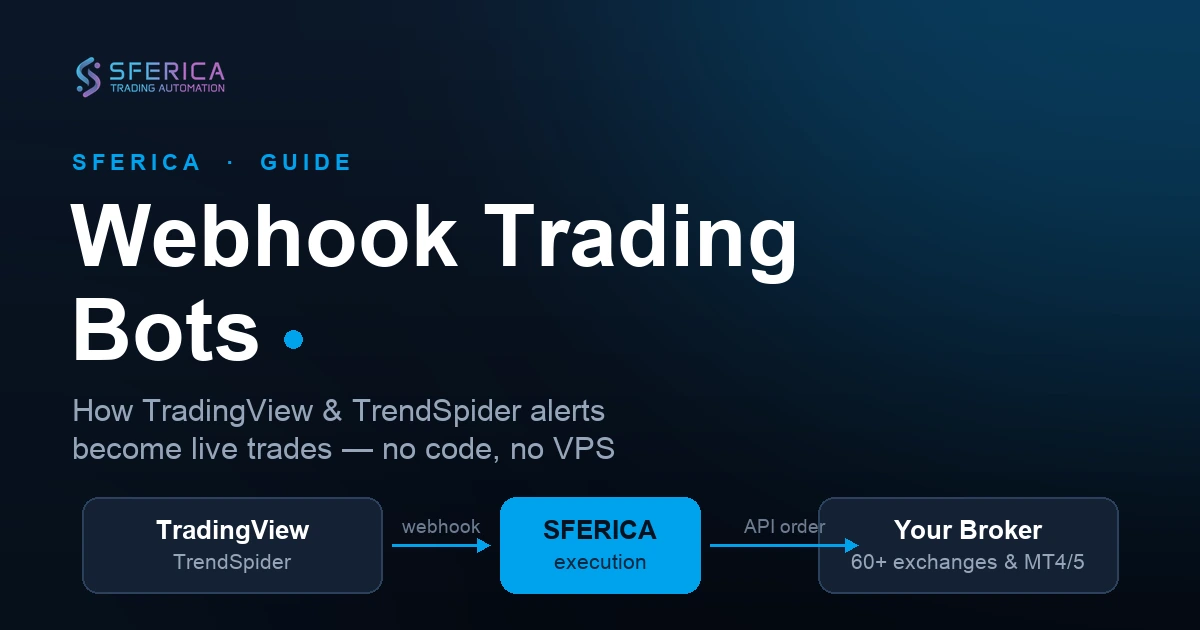
A webhook trading bot turns an alert from your charting platform into a live order on your broker: the alert fires, a webhook delivers it to an execution layer, and the execution layer places the trade through the broker's API. No bot logic runs on your computer.
TradingView and TrendSpider are the two most common signal sources. Both can fire a webhook the instant a strategy condition is met — on their servers, so your machine does not need to be on.
Sferica is the no-code execution layer that sits between the alert and the broker. It receives the webhook, applies your risk rules, and routes the order to any connected exchange or broker — without you writing Python or renting a VPS.
The same webhook pipeline works across 60+ brokers: crypto exchanges (Binance, KuCoin, OKX, Bybit and more), MetaTrader 4/5 for forex, and prop-firm accounts. Only the connector profile changes; the signal path is identical.
Trade-only API keys keep custody with you — Sferica signs orders but can never withdraw funds. Start on the 14-day free trial, connect one broker, and validate the pipeline with a small test position before scaling.
Building a webhook trading bot used to mean writing Python against a broker's REST and WebSocket APIs, renting a VPS to keep the script online around the clock, handling reconnect logic every time a socket dropped, and engineering position sizing and risk controls from scratch. The signal was the easy part — a TradingView alert is one line of Pine Script. Everything downstream of that alert was an infrastructure project most traders had neither the time nor the appetite to maintain.
A modern webhook trading bot keeps the part that always worked — the alert from your charting platform — and throws out the DIY backend, replacing it with a no-code execution layer. This guide walks through what a webhook bot actually is, how a single alert travels from your chart to a live order on your broker, why that beats both a hand-coded bot and a broker's built-in templates, and how to put one together in a few minutes with Sferica.
What is a webhook trading bot?
A webhook trading bot is an automated system that turns an alert from a charting platform into a live order on a broker. It has three moving parts:
- A signal source — a charting platform such as TradingView or TrendSpider, running your strategy and watching the market in real time.
- A webhook — the delivery mechanism. When your strategy's condition is met, the platform sends an HTTP request (the webhook) carrying the signal: which strategy fired, the action to take, and any parameters you embedded in the message.
- An execution layer — the destination that receives the webhook, decides whether the order is allowed, and places it through the broker's API.
The word "webhook" simply describes how the signal is delivered: instead of you polling for a result, the source pushes a message to a URL the moment something happens. That push is what makes the whole pipeline event-driven and instant. The execution layer is where the real work lives — and it is the piece that, historically, you had to build yourself.
How a webhook trading bot works, step by step
Here is the signal path, end to end. It is the same path whether you are trading Bitcoin on a crypto exchange or EUR/USD through MetaTrader — only the final connector changes.
1. The charting platform creates the signal
Your strategy runs on a chart in real time — a Pine Script strategy on TradingView, or an automated trading bot on TrendSpider. When the logic says "enter long", "close position", or anything in between, the platform fires an alert. The alert payload carries the strategy identifier, the action (buy / sell / close), and any custom variables you embedded in the message — target size, stop-loss price, leverage where it applies.
2. The webhook delivers the alert to Sferica
The alert is configured to send a webhook to a Sferica endpoint. Because TradingView and TrendSpider fire alerts from their own servers, this happens regardless of whether your own computer is on. The HTTP request reaches Sferica within a fraction of a second of the condition being met.
3. Sferica validates and routes the order
Sferica decodes the payload, looks up which broker connector the strategy is bound to, and checks that the strategy is still active and inside its risk envelope. If the alert breaks a rule — say you already hold a position and the strategy is configured one-trade-at-a-time — Sferica rejects it and logs the reason on your dashboard rather than firing a bad order. If the alert is valid, Sferica constructs the order request for the target broker.

4. The broker receives the order through its API
Sferica signs the order with your broker API key and submits it. The order type — market, limit, or stop — comes from your strategy configuration; for leveraged products, leverage and margin mode are applied in the same call. The broker returns a fill confirmation or a rejection, Sferica records it, and your performance history updates with the new trade.
That four-stage pipeline is the whole bot. You did not write any of the plumbing, you do not host anything, and there is no socket to babysit. You configured a strategy, generated an API key, and pointed an alert at a URL.
TradingView vs TrendSpider as the signal source
Both platforms feed the same execution layer, so the choice is about how you prefer to build strategies — not about what you can automate downstream.
- TradingView is the most widely used charting platform, and its Pine Script language lets you write or buy almost any strategy imaginable. Alerts are the native delivery mechanism; the free plan is enough to test a single webhook, while intraday automation with several simultaneous alerts needs a paid tier.
- TrendSpider leans into automation-first workflows — multi-timeframe analysis, automated trendlines, and trading bots that fire webhooks without you hand-writing alert logic. If you would rather assemble strategies visually than script them, it is a strong fit. See the dedicated walkthrough in Automated Trading with TrendSpider Trading Bots using Sferica.
You do not have to pick one. Sferica accepts webhooks from either, so a single account can run TradingView strategies and TrendSpider bots into the same — or different — broker connectors at once.
Why a webhook bot beats a hand-coded one
You could still write the execution layer yourself. Here is what you take on if you do, and what a no-code layer absorbs for you:
- Uptime and reconnects. A self-hosted bot has to stay online 24/7 and recover gracefully from dropped sockets and broker maintenance windows. Sferica's servers handle this; there is nothing for you to monitor.
- Risk plumbing. Position sizing, leverage caps, one-trade-at-a-time logic, daily-loss kill switches — all of it is code you would otherwise write and test. In Sferica these are configuration toggles per strategy.
- Multi-broker support. Each broker has its own API quirks: order types, margin handling, rate limits. A hand-coded bot has to implement each one. Sferica maintains the connectors so the same strategy can target any supported broker.
- Deduplication and buffering. A strategy that fires on every bar can spam a broker into rate-limit errors. The execution layer buffers and de-duplicates so a slightly over-active alert does not break execution.
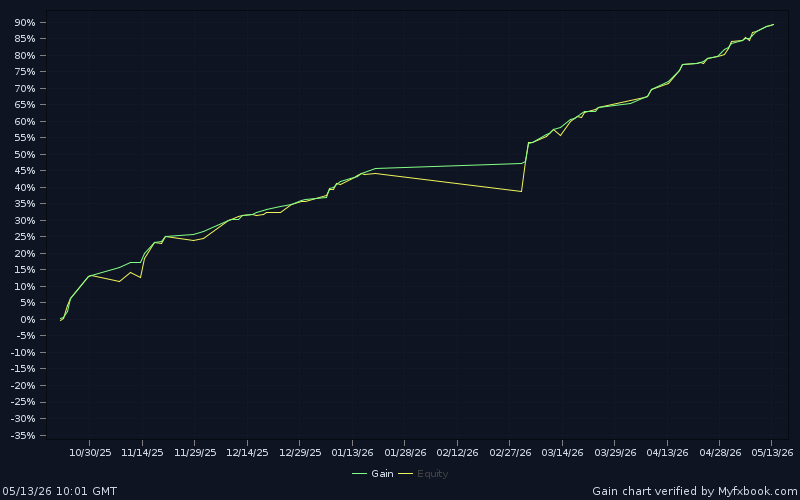
- Transparency. Strategies on the Sferica leaderboard ship with live-tracked performance from real accounts — not a backtest highlight reel — so you can see what a strategy actually did before you run it.
Why a webhook bot beats a broker's built-in templates
Many brokers and exchanges ship their own "bots" — grid bots, DCA bots, rebalancing bots. They are useful for the narrow case they target (passive, range-bound markets), but they are not a substitute for a signal-driven webhook bot, for three reasons:
- No external signals. A native template cannot be triggered by a TradingView alert, a TrendSpider bot, or any custom logic you built outside the platform. It is an isolated system.
- No strategy authorship. You cannot read a template's internal logic, modify it, or port a strategy that worked elsewhere onto it. You pick from a fixed menu of parameters.
- No cross-platform reach. A native bot only trades on the platform that hosts it. A webhook bot routes the same strategy to whichever broker you connect — and to several at once if you want.
The two are not mutually exclusive. Run a native grid bot on a quiet pair and a Sferica webhook strategy on a major at the same time; they do not interfere.
What you can connect
The strength of a webhook pipeline is that the signal path never changes — only the connector at the end does. Sferica supports more than 60 brokers across asset classes, so the same TradingView or TrendSpider strategy can target very different markets:
- Crypto exchanges. Spot and futures on the major venues. Step-by-step guides are already live for Binance, KuCoin, and OKX, with the same no-code flow for Bybit, Kraken and others on the integrations directory.
- Forex and indices via MetaTrader. MetaTrader 4 and MetaTrader 5 connect through the same pipeline, so a Pine Script strategy can drive an MT4 forex account. See MetaTrader 4 copy trading with Sferica for a worked example.
- Prop-firm accounts. If you trade a funded MT4/MT5 challenge or evaluation, the same automation applies — covered in Automate TradingView Strategies for Prop Firms.
How to build your webhook trading bot
The setup is the same shape for every broker. In outline:
- Start a Sferica account. The 14-day free trial covers the full setup and the first days of live trading.
- Pick or build a strategy. Deploy one from the live leaderboard, or bring your own TradingView Pine Script / TrendSpider bot.
- Generate a trade-only API key on your broker — trading permission enabled, withdrawal disabled — and paste it into the matching Sferica connector.
- Point the alert at Sferica. Configure your TradingView alert (or TrendSpider bot) to send its webhook to the Sferica endpoint, with the message format Sferica expects.
- Run a small test trade. Before scaling, fire the strategy on a small position and confirm the order appears on your broker and in the Sferica log. This single step catches almost every misconfiguration.
- Scale once it is clean. After the test executes correctly, raise size within your risk plan and let the pipeline run.
The broker-specific details — exactly which permissions to tick, which connector profile to choose — live in each integration's own guide, but the pipeline above never changes.
Risk management for webhook bots
Automation changes who pulls the trigger, not the underlying risk of the position. These controls matter most for any signal-driven bot:
- Cap position size per trade. Set a fixed-dollar or percent-of-account size per strategy. Start low — 1% to 2% of the connector's balance per trade — and raise only after 30 days of live data.
- Cap leverage per strategy. On leveraged products, almost nothing in rules-based trading needs more than 3x–5x. A single bad bar at high leverage can wipe an account; Sferica enforces the cap on every order.
- Set a daily-loss kill switch. Sferica's account-level kill switch pauses every strategy when the connector hits a configurable daily-loss threshold. Black-swan days happen — use it.
- Run a test position first. The most common cause of a runaway bot is going live without the small-size test. Never skip it.
- Watch correlation. Two strategies that look diversified on backtests can move together in live markets. Sferica's portfolio view shows live correlation between active strategies so you do not unknowingly double an exposure.
Common webhook bot mistakes to avoid
These come from real users in their first weeks of automating, not from theory:
- Granting withdrawal permission to the API key. Almost no one needs it. If you ticked it by reflex, revoke the key and recreate it with withdrawals disabled.
- Mismatching the alert message and the connector. If the webhook payload does not match what the connector expects, the order is rejected. Check the message format against the connector before blaming the strategy.
- Going live without the test trade. A misconfigured alert can fire a burst of orders the instant the chart ticks. The small-size test exists precisely to catch this.
- Picking the top-ranked strategy without checking live duration. Recent leaders can be variance. Filter the leaderboard by 90+ days live, profit factor above 1.5, and consistency before committing capital.
- Over-active alerts. A strategy that fires on every bar can hit a broker's rate limits. Sferica buffers and de-duplicates, but it cannot fix a fundamentally over-triggering strategy — fix it at the source.
Next steps: build your first webhook bot
A webhook trading bot is no longer an engineering project. The signal already exists in your charting platform; Sferica supplies the execution layer that used to take weeks to build. Start the 14-day Sferica free trial, connect one broker with a trade-only API key, point a TradingView or TrendSpider alert at it, and run a small test trade — the first connector is genuinely a few minutes of work.
From there, the full broker directory is on the Sferica integrations page, the broker-specific walkthroughs are linked throughout this guide, and the live performance leaderboard updates daily with every strategy running on the platform — so you can see what is actually trading before you commit to anything.
Trading involves risk. Past performance is not indicative of future results. Read Sferica's risk disclosures before you allocate capital to any strategy.
Frequently Asked Questions
What is a webhook trading bot?
A webhook trading bot is an automated system that converts an alert from a charting platform into a live order on a broker. When your strategy's condition is met, the platform sends an HTTP request (a webhook) containing the signal — buy, sell, or close — to an execution layer. The execution layer reads the payload, checks it against your risk rules, and places the order through the broker's API. Nothing runs on your own computer, so the bot keeps working whether you are online or not.
Do I need to know how to code to build a webhook trading bot?
No. The traditional way — writing Python against a broker's REST and WebSocket APIs and hosting it on a server — does require coding. A no-code execution layer like Sferica removes that step entirely: you generate a trade-only API key on your broker, paste it into a connector, point your TradingView or TrendSpider alert at the Sferica webhook, and the pipeline is live. The only mildly technical step is creating the API key, and brokers provide a guided flow for it.
What is the difference between a TradingView webhook and a Sferica connector?
A TradingView webhook is just the delivery mechanism — TradingView sends an HTTP request to a URL when your alert fires. That request has to land somewhere that knows how to turn it into a real order. The Sferica connector is that destination: it decodes the payload, maps the strategy to the right broker account, applies position sizing and risk limits, and submits the order through the broker's API. The webhook carries the signal; the connector executes it.
Can I use TrendSpider instead of TradingView?
Yes. TrendSpider can fire webhooks from its automated trading bots the same way TradingView fires them from Pine Script alerts. Sferica accepts the webhook from either source, so you can run TradingView strategies, TrendSpider strategies, or both at once into the same broker account. The execution side does not care which platform generated the signal.
What happens to my webhook bot if my computer is off?
Nothing changes — it keeps trading. TradingView and TrendSpider fire alerts from their own servers, Sferica receives and processes them on its own servers, and the order routes to your broker through its API. Your laptop being on or off, asleep or awake, has no effect on whether trades execute. Removing that dependency is one of the main reasons traders automate in the first place.
Is it safe to connect my broker with an API key?
When the key is scoped correctly, yes. Create the API key with trading permission only and leave withdrawal disabled — that way the execution layer can place and close orders but can never move money out of your account. Sferica stores keys encrypted at rest and only decrypts them in-process at order-execution time. If anything ever looks wrong, you revoke the key on the broker and the connector loses the ability to trade within seconds.
Which brokers and exchanges can a Sferica webhook bot trade on?
More than 60, across asset classes. On crypto that includes Binance, KuCoin, OKX, Bybit, Kraken and others; on forex and indices it covers MetaTrader 4 and MetaTrader 5; and prop-firm accounts running MT4/MT5 are supported too. The full, current directory lives on the Sferica integrations page. The pipeline is identical for every one of them — only the connector profile you select changes.
Can I cancel my Sferica subscription anytime?
Yes. Sferica is a month-to-month subscription with a 14-day free trial up front. You can connect a broker, run a strategy, and decide whether the automation earns its keep before any payment is taken, and you can cancel from the dashboard whenever you like.
Ready to Automate Your Trading?
Explore our plans and start your 14-day free trial today.
View PricingTable of Contents
- What is a webhook trading bot?
- How a webhook trading bot works, step by step
- 1. The charting platform creates the signal
- 2. The webhook delivers the alert to Sferica
- 3. Sferica validates and routes the order
- 4. The broker receives the order through its API
- TradingView vs TrendSpider as the signal source
- Why a webhook bot beats a hand-coded one
- Why a webhook bot beats a broker's built-in templates
- What you can connect
- How to build your webhook trading bot
- Risk management for webhook bots
- Common webhook bot mistakes to avoid
- Next steps: build your first webhook bot